
Why placement decides whether a directory earns its install
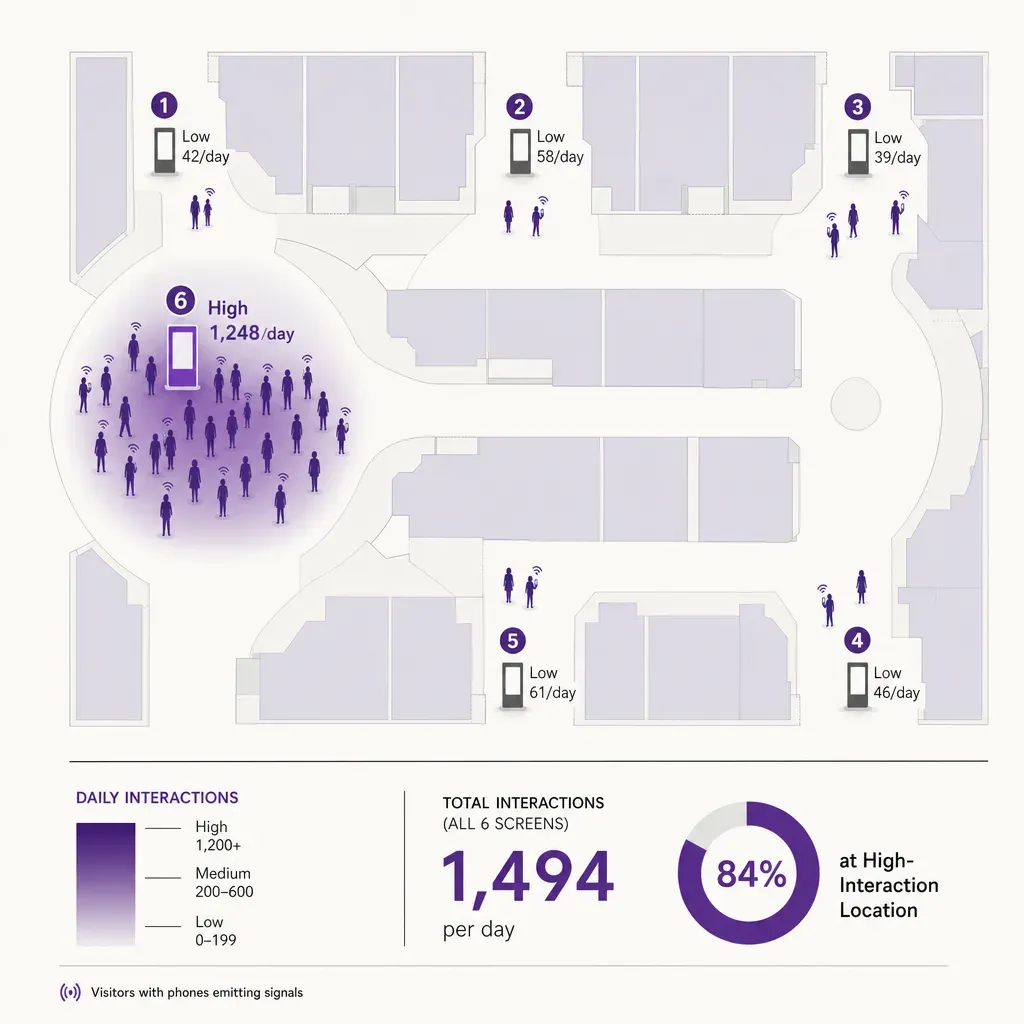
A mall directory screen is a useful object when a shopper actually uses it. The rest of the time it is a bright rectangle on a wall, drawing power and reporting nothing. The single largest factor in which of those two states a screen sits in is not the software running on it or the size of the panel. It is where the screen lives in the building. A well-placed directory at the spot where a visitor stops and decides where to go next collects hundreds of interactions a day. The same hardware ten metres down the corridor, past the decision point, collects a handful.
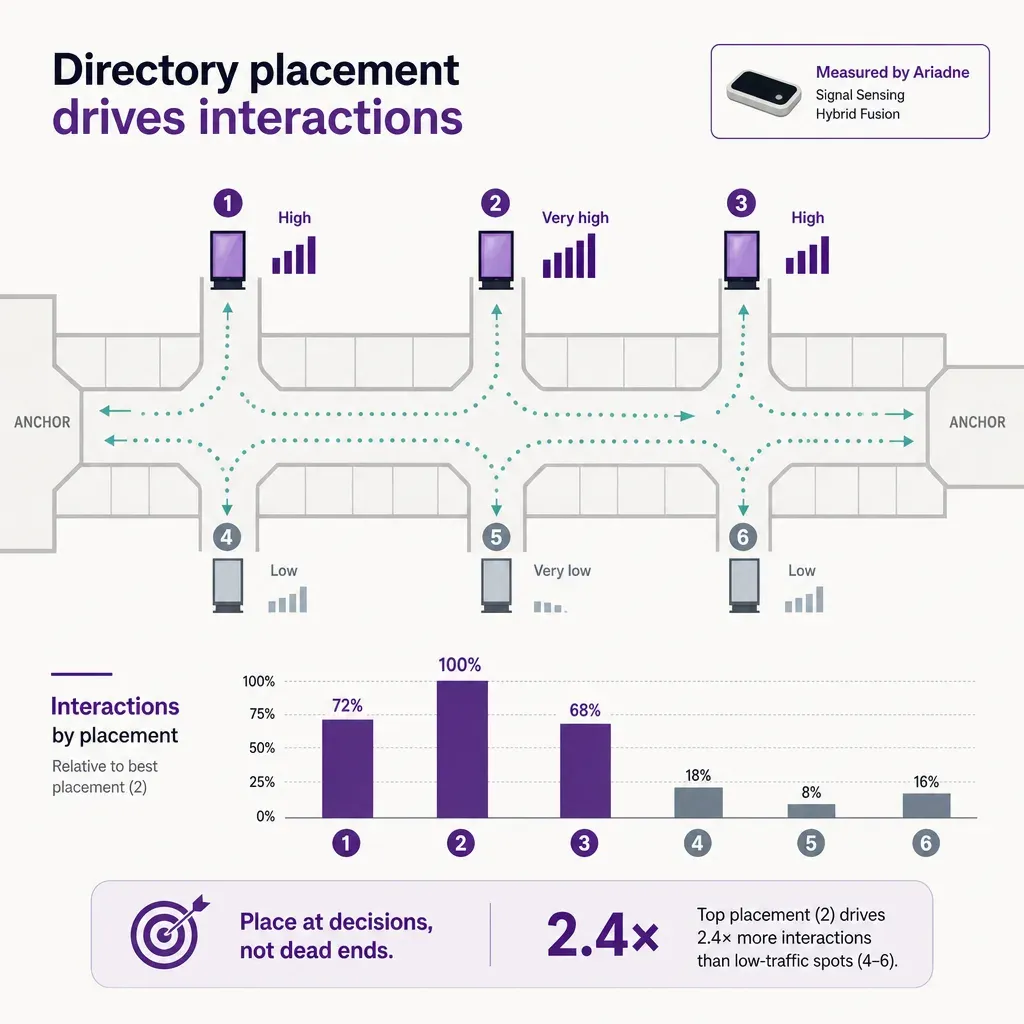
The placements below are the six that consistently earn their install in a shopping centre, judged by interactions and by the downstream navigation events they produce. The post closes on how to measure interaction honestly, without capturing identity, which is the harder problem and the one that decides whether the reporting holds up under GDPR and the EU AI Act.
The six placements that consistently drive interaction
1. Post-security or post-entry decision zone
The first directory worth its install sits a few metres inside the main entrance, in the line of sight of a shopper who has just walked through the doors and is orienting themselves. They are scanning for cues: where the anchors are, where the food court is, whether the level they want is left or right. A directory here catches that moment, and interaction at this spot is reliably higher than at any other location in the centre because the shopper has not yet committed to a direction.
Practical notes: keep it out of the door swing and off the immediate path so a queue at the screen does not block the entry, but in clear sightline from the doors. If the shopper has to walk around a column or a gate frame to see it, they will not.
2. Major decision points along the spine
Most enclosed malls and several open centres have a primary spine, with secondary corridors branching off. The points where the spine forks, where a courtyard opens, or where a corridor changes direction are secondary decision moments. A shopper who has been moving with intent stops at these spots to re-orient, particularly if the destination is on the far side of the centre. A directory at a major decision point catches that re-orientation, and supports directed search from a here-now location rather than from the entrance.
3. Anchor-tenant junctions
Anchor stores generate disproportionate inbound and outbound traffic, and the corridor between an anchor entrance and the mall spine is one of the highest-flow areas in the centre. A shopper exiting an anchor has just finished an errand and is making a new decision: leave, eat, or visit another store. A directory at an anchor junction catches that decision and routes the shopper deeper into the centre. It also catches incoming traffic from the anchor's parking entrance, which is often a different population from the main-entrance shopper.
Placement detail: position the screen so it is visible from inside the anchor concourse, not just from the mall corridor. The boundary is exactly where the line of sight has to work in both directions.
4. Vertical-circulation hubs
Escalator landings, elevator lobbies, and the top and bottom of stairwells are vertical-circulation hubs. They concentrate flow from multiple levels into one point, and they are stopping points by design: a shopper steps off an escalator and has to choose a direction. A directory here is read by visitors who have just changed levels and are working out which way to go on the new floor, which is precisely when a level-specific map is most useful. Stack two screens at the same hub, one for each direction of travel, before assuming a single panel will serve both populations.
5. Food-court entry and the food corridor
Food courts pull a different visit pattern from the rest of the centre. A shopper heading for food is moving with intent on the way in and browsing the options at the threshold. A directory at the entry to a food court, facing the seating area, catches the threshold browsing and supports the second decision the shopper makes once seated: where to go next. Centres with a linear food corridor can place screens at the corridor entry and at any major branching point inside it.
This is also the placement where wayfinding meets promotion. A directory at the food entry is one of the few screens where a shopper will accept a tenant promotion as part of the navigation interface, because the food choice itself is the navigation event. Keep promotion subordinate to the map; the placement earns its install on wayfinding, not on advertising.
6. Rest and waiting zones
Benches, lounge seating, family rooms, and the area near customer-service desks are the rest zones in a centre. A shopper here is between trips. They have completed one thing, are about to do another, and have a moment of attention to spend. A directory in line of sight of a seating cluster catches that moment, and the interaction tends to be longer and more deliberate than at the entry: shoppers searching for a specific store, planning a multi-stop route, or checking opening hours.
The placement detail here is comfort. The screen has to be readable from a seated position, which means height, glare, and contrast are set differently from a screen designed for a standing shopper. Centres that install rest-zone directories at the same height as their entry directories tend to report low interaction from this spot, and the height is usually the reason.
How to measure interaction without capturing identity
A directory earns its install when interactions translate into navigation events: a route shown, a destination tapped, a search resolved. The hard part is measuring that without turning the screen into a surveillance object. The available approaches break into three groups by what they actually capture.
- On-screen interaction telemetry. The screen itself reports touches, sessions, dwell on the screen, and the queries the shopper enters. None of this requires identifying the shopper. A session is bounded by a timeout, a search query is the text the shopper typed, and the navigation event is the destination they tapped through to. All of this can be reported as aggregate counts without storing any per-visitor record.
- Footfall in front of the screen. How many shoppers passed the screen, how many stopped, and how the stop rate varies by time of day. This is a counting question, not an identification question, and it is the input that turns interaction counts into a conversion rate (interactions per opportunity-to-see). It needs a method that counts people and dwell at the screen without using cameras.
- Search-query topic distribution. The aggregate distribution of what shoppers searched for. Which categories the centre is searched for most often, which specific stores draw repeat searches, what proportion of searches are for non-retail (toilets, parking, the food court, an ATM). This is reported at the category and store level, not at the visitor level.
What none of these need to be useful: a camera at the screen, a face-detection model, demographic inference from facial features, or a per-visitor identifier. A directory measurement programme that does not need those should not have them. Under the GDPR, any of them turn the screen into a personal-data system; under the EU AI Act, the demographic inference one is restricted in publicly accessible spaces. Set the stack so that the screen reports interaction and the surrounding sensors count people and dwell, and the analytics work without producing personal data.
How Ariadne fits
Ariadne provides the footfall and dwell layer that sits around the screen, designed so that nothing identifying is captured at any point.
Ariadne measures this with Hybrid Fusion, its patented camera-free method. Time-of-Flight depth sensing counts every visitor at the entrances, capturing geometry rather than images, while patented phone signal sensing follows movement through the interior, detecting the signals a phone emits even in airplane mode. The sensor streams both feeds to Ariadne, where Hybrid Fusion combines them into one trajectory per visit and computes counts, dwell, and paths. The streams carry no identifier: no MAC address, no device ID, no biometric data, and no camera is involved. Identifiers are stored only when a visitor explicitly opts in, which keeps the method GDPR-friendly and outside biometric territory.
For a directory programme, the practical consequences are direct. The footfall in front of each screen is reported continuously, so the interaction count from the screen can be expressed as a conversion rate against opportunity-to-see rather than as a raw number. Dwell in the screen's coverage zone reports whether shoppers stopped or walked past, which separates a productive placement from one that looked good in the floor plan but does not earn its install. The people counting layer feeds the same dashboards as the rest of the centre, so directory performance can be compared like-for-like against other parts of the floor plan, and the visitor marketing reporting that goes to anchor tenants and major retailers is produced under a design that captures no images, no faces, no MAC addresses, and no device identifiers by default. Centres extending the same data into indoor navigation on the mobile app can do so with the same no-personal-data posture; data handling is described in the privacy policy.
A placement and measurement checklist
If you are specifying directory screens for a centre or auditing an existing install, these are the questions worth working through site by site before committing to a panel position.
- Does the placement sit at a real decision moment? Entry, major decision point, anchor junction, vertical-circulation hub, food entry, rest zone. A directory in a transit corridor where shoppers are moving with intent and not deciding tends to report low interaction regardless of the panel.
- Is the line of sight clean? Columns, signage, gate frames, and retail facade lighting all reduce the visibility of a directory. Walk the placement at the times the centre is busiest, not just at install.
- Is the height set for the audience? Entry and corridor placements are read standing; rest-zone placements are read seated. Different placements, different heights.
- Is the footfall in front of the screen being counted? Interaction counts without footfall counts produce a number you cannot benchmark. Pair every directory with a count of who passed.
- Does the measurement stack capture personal data? Confirm in writing that the footfall and dwell layer at the screen does not use cameras, does not infer demographic categories, and does not record device identifiers by default. This is the test that decides whether the reporting can be shared with tenants and regulators without redaction.
- Is search-query data being reported at the right level? Per-category and per-store search counts are useful for tenant reporting and leasing decisions. Per-visitor search histories are not, and they create risk that the rest of the design avoided.
FAQ
How many directory screens does a centre actually need?
Fewer than most centres install. The six placements above are the ones that consistently earn their install. A directory that does not sit at a decision moment will under-perform regardless of the panel quality or the software. It is better to install fewer screens at the right placements than to spread budget across positions that will not be used.
Do directory screens need cameras to measure interaction?
No. Ariadne counts with Hybrid Fusion: Time-of-Flight depth sensing plus patented phone signal sensing, never cameras. Time-of-Flight captures geometry rather than images, and signal sensing captures no MAC address by default, so the measurement involves no video, no faces, and no biometric data.
Interaction with the directory itself is captured by the screen (touches, sessions, search queries). Footfall and dwell in front of the screen are captured by sensors that do not use cameras and do not record device identifiers by default. The combination produces a complete picture of who passed, who stopped, who interacted, and what they searched for, without capturing personal data.
Can search-query data be shared with tenants?
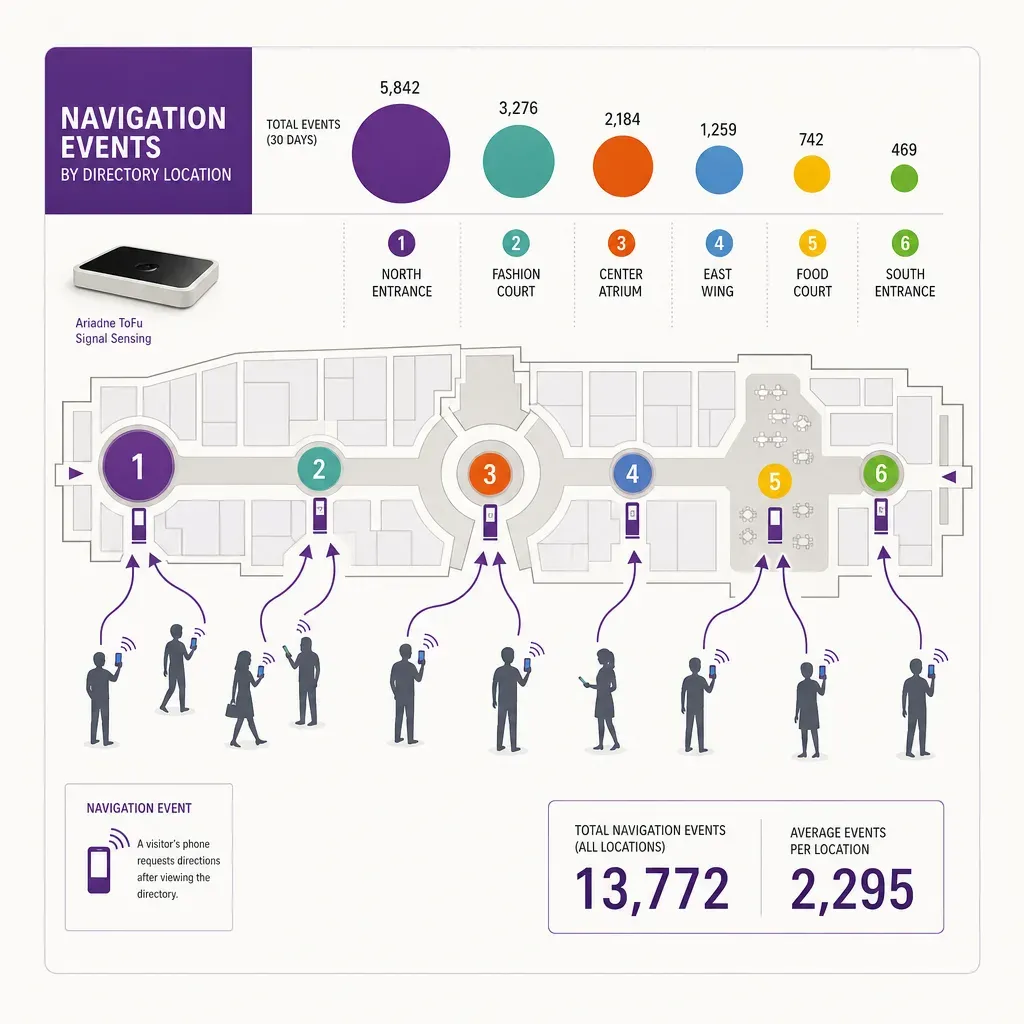
Yes, when it is aggregated. Category-level and store-level search counts are useful inputs for tenant reporting, leasing decisions, and remerchandising. The bar is that the data shared is aggregate (how often a category or store was searched for during the period), not per-visitor (which would create a tracking record around the screen). A measurement programme that holds to that line can share useful data without the risk that comes with the per-visitor version.


