
What retail geofence marketing actually does
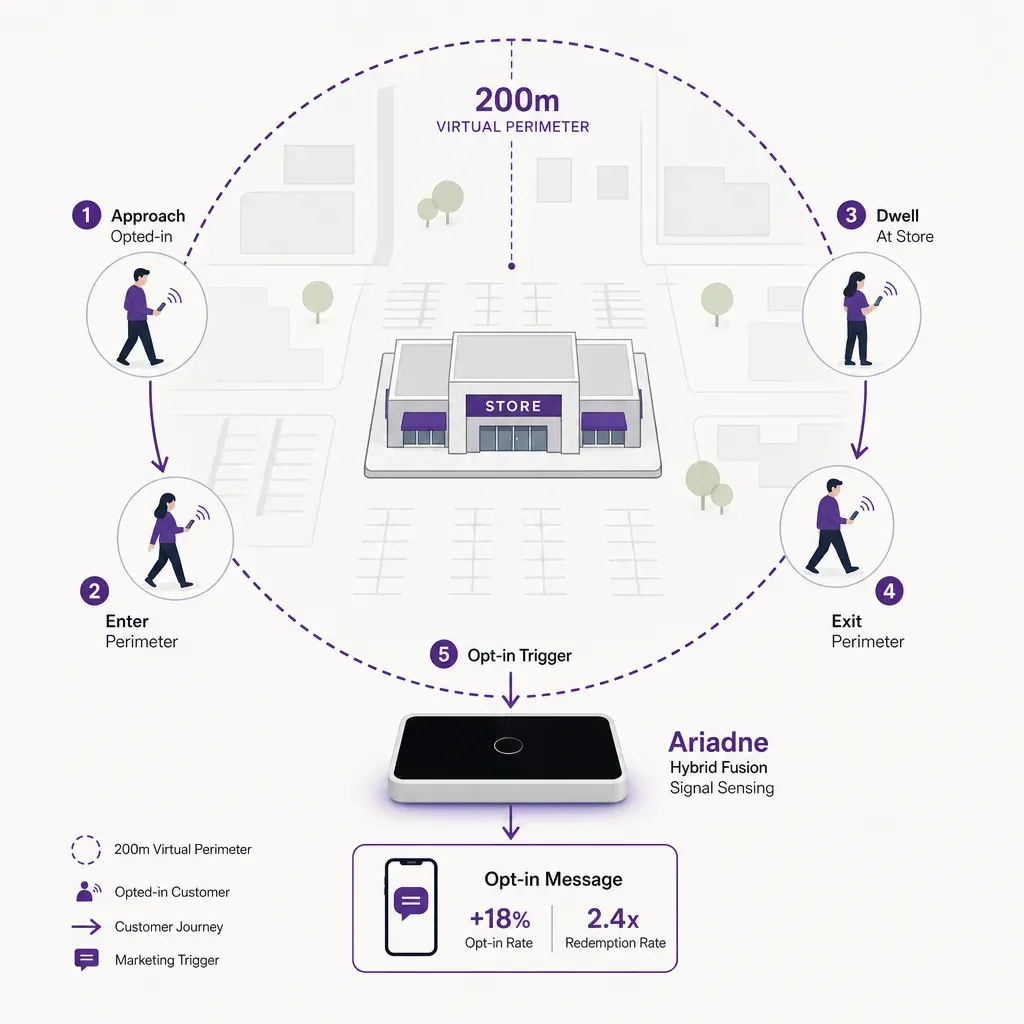
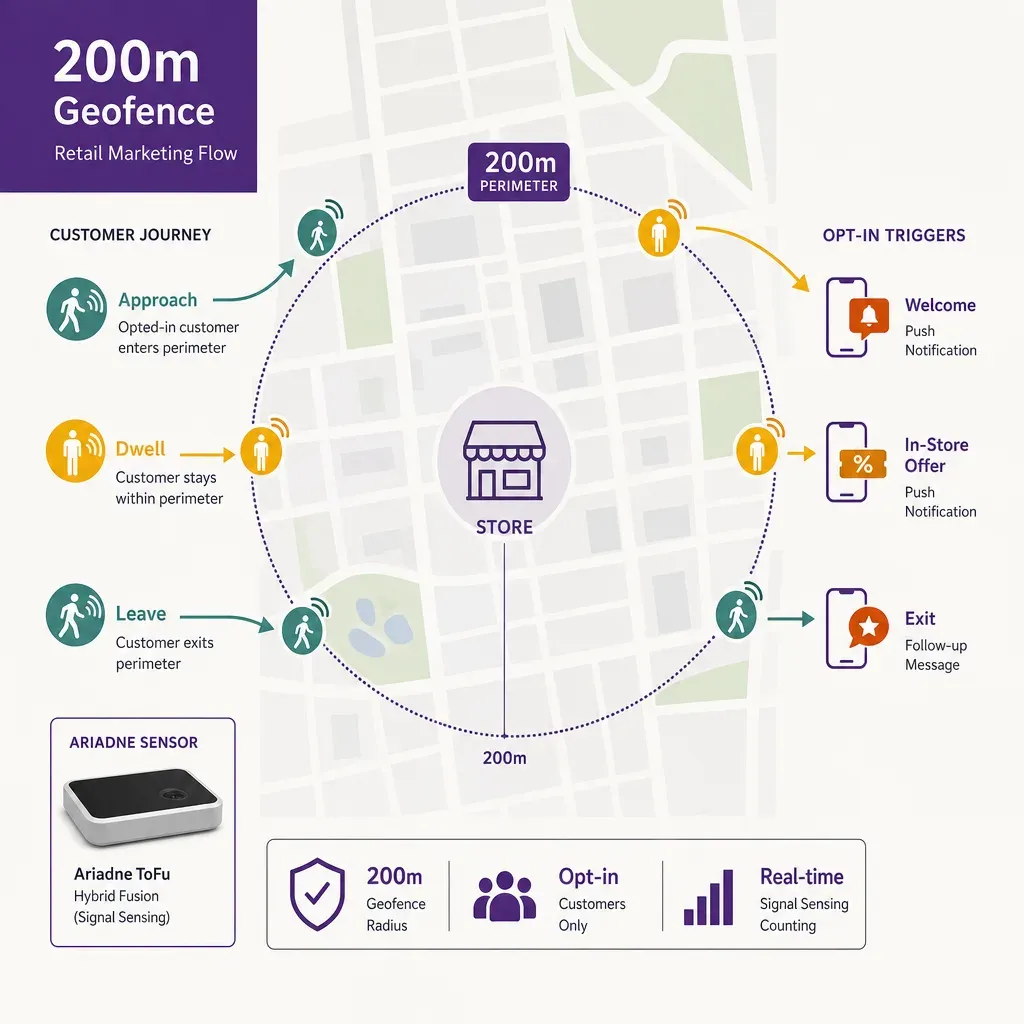
Retail geofence marketing draws a virtual perimeter around a store and triggers something when an opted-in customer enters, dwells inside, or leaves it. The perimeter is usually a 100 to 300 metre radius around the storefront, with 200 metres a common starting point for high-street and shopping-centre locations. The trigger is usually a push notification, an in-app card, an email, or an ad bid raised in a connected media buy. The point of the perimeter is not the radius itself. It is the signal that a known customer is close enough to the store that a well-timed message changes whether they walk in.
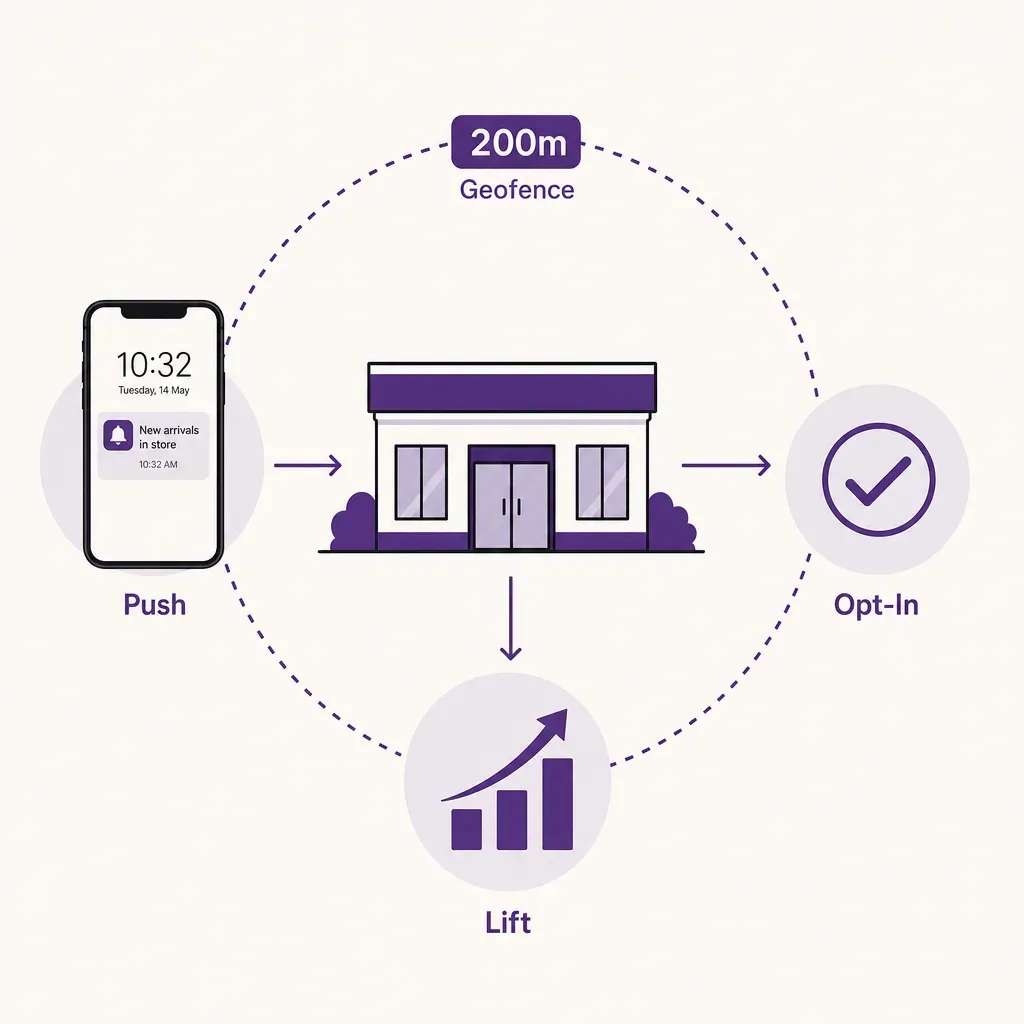
Done well, a geofence programme is the most concrete bridge a retailer has between digital marketing and physical conversion. Done badly, it is the noisiest channel in the stack: the customer who gets the same coupon every time they walk past on their commute, the push that fires at 06:00 because the geofence does not know the store is shut, the offer that has no relation to the weather, the stock, or the queue inside. This post walks through the parts of a geofence programme that decide which of those two outcomes you get. Throughout, it is paired with what a visitor marketing platform contributes once a visitor crosses the threshold and how the loop is closed back to a measurable lift in store visits.
The 200 metre perimeter and why the radius matters
A 200 metre radius around a high-street store covers roughly 12 to 13 hectares. In a dense city centre, that is enough to include the foot traffic at the next intersection, a transit stop or two, and the neighbouring retailers. It is small enough that an opted-in customer inside the fence is plausibly within a three to four minute walk of the storefront. That is the window where a contextual message has a chance of changing behaviour. Outside that window, the customer is either out of range to act or already inside the store, where a geofence trigger is the wrong tool.
Two practical patterns hold across geofence programmes that work. The first is that the radius is location-specific, not network-wide. A flagship in a dense city centre may need a 100 metre perimeter to avoid firing on passers-by who will never enter the catchment. A suburban store with parking and a longer last-mile may need 400 to 500 metres to catch the customer who is still deciding which store to drive to. A network-wide default fence ignores the difference and produces uneven trigger rates.
The second is that the entry into the fence is rarely the only useful event. A clean geofence stack reports three events per visit: enter, dwell (the customer has been inside the perimeter for a defined minimum, typically 60 to 120 seconds, which filters out passers-by), and exit. Entry is the cue to consider a trigger. Dwell is the signal that the customer is plausibly close and not simply passing through on a vehicle. Exit is the cue to close the visit, attribute the outcome, and, if the customer never entered the store, drop them out of the trigger list for a defined cool-down period.
Opt-in trigger frequency: the rule that keeps the channel useful
The single fastest way to break a geofence programme is to fire it too often. A push notification that lands every time the customer walks past the store on their commute is the message that gets the app deleted. The data on this is unambiguous across mobile-marketing benchmarks: notification opt-out rates rise sharply once the daily frequency goes past a small number of contextual triggers, and a deleted app costs every channel, not only the geofence one.
A geofence trigger policy that holds up across a year of operation usually has four moving parts.
- A per-customer daily cap. No more than one geofence-triggered message per day, regardless of how many fences the customer crosses. The cap protects the customer from a noisy day in the city.
- A per-store cool-down. Once a customer has received a trigger for a given store, the same store cannot trigger again for a defined period, often 72 hours to seven days. The cool-down stops the same offer landing on the same commuter five days in a row.
- A quiet-hours window. No triggers outside store opening hours, and a hard floor at 09:00 to 21:00 local time even when the store is open later. Geofence pushes that arrive at 06:00 because a customer is on an early train are the canonical complaint.
- A relevance gate. The trigger fires only when there is a creative variant that has been selected for the current context. If the system cannot decide what to send, it sends nothing. Silence is the correct default.
The relevance gate is where creative rotation does its work, and it is the part of the stack that turns a geofence programme from a coupon hose into a useful channel.
Creative rotation by time-of-day, weather, and footfall
A geofence trigger is the cheapest place in a marketing stack to make a creative decision based on real context, because the customer has already raised a hand by opting in and the location is already known. The question is which inputs are worth wiring in.
Three signals carry most of the weight in practice. None of them is exotic, and all three can be sourced without touching personal data.
- Time-of-day and weekday. Different propositions land at different times. Coffee and breakfast in the morning rush, lunch offers and on-the-way-home prompts in the late afternoon, weekend family creative on a Saturday. The schedule is built once per store, refined per quarter, and applied as a creative-selection rule the geofence engine evaluates before sending.
- Weather. Wet weather changes the relevant offer. So does an unseasonably warm afternoon. Most marketing clouds have a weather data feed already wired in for email and on-site personalisation, and the same feed can be reused for geofence trigger selection without bolting on a new vendor. The rule is usually simple: a small library of weather-conditional creatives per store, and a selection step that picks the right one for the current forecast.
- Live footfall and queue. This is the input most geofence programmes never use, and the one with the largest practical effect. A trigger that pushes a customer into a store that is already at capacity, with a five-minute queue at the till, makes the customer's experience worse. A trigger that delays itself by 30 minutes, or that redirects to a quieter sister store, makes it better. Live footfall and live queue length are the inputs that let the trigger engine make that call.
Live footfall is where a people counting system feeds the marketing stack directly. The store's current visitor count and an inferred queue state at the till become creative-selection inputs alongside the schedule and the weather. The relevance gate stops checking only whether there is a creative to send, and starts checking whether the store can usefully receive the customer in the next 10 minutes. That is the rule that keeps the channel pulling in the right direction for both sides of the counter.
The post-visit lift measurement loop
A geofence trigger is worth what it adds, not what it claims. The honest measurement question is: of the customers who received a trigger and were inside the fence, how many entered the store within a defined window, and how does that compare with a comparable group who did not receive the trigger? Anything else is vanity. The loop has four moving parts.
- A holdout group. A defined percentage of the opted-in audience, usually 10 to 20 percent, is held out of the trigger send for a campaign cycle. They are the control. They cross the fence, the system records the event, but no message is delivered. The lift is the difference between the trigger group and the holdout group, not between the trigger group and last month's baseline.
- A defined visit window. The visit attribution window has to be set explicitly per campaign, often 30 to 120 minutes after the trigger fired. A walk-in two days later is not the trigger's work. Setting the window short and explicit is the cleanest way to make the lift figure defensible.
- Door-level visit signal. A walk-in is detected at the door. The cleanest way to get that signal at the population level, without depending on every customer turning on Bluetooth and the app being awake, is a door-level visitor counter that produces a continuous, accurate entry count regardless of whether each individual customer is identifiable. That figure is what the trigger group and the holdout group are scored against, joined back at the aggregate level rather than the individual level.
- Aggregate join, not individual tracking. The point of the join is to compare two cohorts at the population level, not to confirm whether a specific person walked in. That distinction matters legally, and it matters operationally because the door-level data does not need to identify anyone for the lift figure to hold.
Across the geofence programmes that survive an honest annual review, the lift figures are usually meaningful but modest: low single-digit to low double-digit percentage uplift on store visits for opted-in customers in the trigger group versus the holdout. The figure varies sharply by category, store density, and creative quality. The discipline is to report the actual range honestly and to drop the trigger configurations that do not produce a real lift against control.
GDPR-safe consent patterns
A geofence trigger relies on knowing where a customer is. In the EU and the UK, that is location data, and it is subject to the GDPR (and to the e-privacy rules for cookies and similar tracking on a device). The compliance work is not optional and is not difficult, provided four patterns are in place from the start.
- Specific, informed, unambiguous consent at the app level. The customer turns on location-based marketing as a distinct choice inside the app, not as a side effect of accepting a long terms-of-service screen. The wording explains what is collected (location while the app is in use, or in the background if relevant), what it is used for (in-store offers and store recommendations), and how often it is processed.
- A separate consent for push notifications. Operating-system-level push consent is necessary but not sufficient. A geofence-marketing consent is a separate, granular choice the customer can switch off without having to disable push for the whole app.
- Data minimisation at the trigger engine. The engine needs the customer's current location while a fence is being evaluated, and the customer's marketing identifier to deliver the message. It does not need a stored trail of every fence crossing. A clean implementation evaluates the fence, sends or holds the trigger, and discards the location event from durable storage unless the customer's consent specifically covers retention for analytics.
- Withdrawal that takes effect immediately. The customer can turn off geofence marketing inside the app, and the trigger engine respects that change the next time it checks consent, not on a 24-hour cron. The same pattern applies to deletion: when the customer withdraws their account, the marketing identifier and the historical fence data go with it.
The store-side measurement loop described above sits cleanly under these rules because it does not require identifying any individual customer at the door. The trigger group and the holdout group are compared at the population level, and the door count is a non-personal aggregate. The location data on the customer's side, where consent applies, is processed under the app's documented consent. The two halves of the loop meet at the cohort level, not at the person level.
How Ariadne fits
Ariadne is the in-store half of the loop. It produces the door-level visitor counts and the live footfall feed that a geofence engine needs for relevance gating and lift measurement, designed so that nothing identifying is captured at the door.
Ariadne measures this with Hybrid Fusion, its patented camera-free method. Time-of-Flight depth sensing counts every visitor at the entrances, capturing geometry rather than images, while patented phone signal sensing follows movement through the interior, detecting the signals a phone emits even in airplane mode. The sensor streams both feeds to Ariadne, where Hybrid Fusion combines them into one trajectory per visit and computes counts, dwell, and paths. The streams carry no identifier: no MAC address, no device ID, no biometric data, and no camera is involved. Identifiers are stored only when a visitor explicitly opts in, which keeps the method GDPR-friendly and outside biometric territory.
For a retail geofence programme, the practical consequences are straightforward. The live footfall feed and queue-state signal can be wired into the trigger engine, so the relevance gate can choose to send, delay, or redirect a trigger based on the current state of the store. The door-level visit count is the figure the trigger group and the holdout group are scored against in the lift loop, joined at the cohort level rather than the individual one. And because the in-store data layer carries no MAC address, no device identifier, and no biometric data, the geofence programme can hold up to a privacy review without the door-side counter being the weak link. The hardware and the data handling sit alongside the wider retail people counting work, and the data design is set out in the privacy policy.
A buyer checklist for a geofence programme
If you are specifying or auditing a retail geofence programme, these are the questions worth putting to the platform vendor and to the in-store data provider in writing.
- What is the per-store radius logic? Confirm that radius is configurable per location and that there is a defensible reason for the default. A network-wide 200 metre fence is a starting point, not a final answer.
- What trigger-frequency rules are enforced by default? A daily per-customer cap, a per-store cool-down, and a quiet-hours window should be on by default. If the platform offers them only as opt-in features, the platform is not protecting the channel.
- What contextual inputs feed the relevance gate? Time-of-day and weather are table stakes. Live footfall and queue state are what separate a useful gate from a marketing rule engine that fires regardless.
- What does the lift measurement look like? Confirm the holdout group, the visit window, and the door-level signal that closes the loop. A platform that reports trigger-to-walk-in conversion without a holdout is reporting correlation, not lift.
- How is consent withdrawn, and how fast? Real-time consent withdrawal, with deletion of the historical trail on account closure, should be a documented capability rather than a promise.
- What does the door-side counter capture? If the door-level data is collected via cameras, demographic inference, or device-identifier tracking, the privacy posture of the whole geofence programme degrades to that of its weakest component. A camera-free, identifier-free door count is the cleanest pairing.
FAQ
Does a retail geofence need to identify the customer at the door?
No, and it should not. The customer is identified inside the app, where they have given consent. The store-side measurement only needs an aggregate visit count at the door, joined back to the trigger and holdout cohorts at the population level. A door-level counter that produces accurate entry figures without capturing personal data is the right shape for that join.
Does live footfall make a real difference to trigger performance?
It does in two directions. It avoids pushing customers into a store that cannot absorb them, which is the failure mode that destroys experience and produces complaints. And it lets the trigger engine choose its moment: hold the message for 30 minutes when the queue is long, send it now when the store is quiet and the conversion conditions are good. The effect on lift is usually meaningful and shows up first in the holdout-controlled measurement, not in the unfiltered campaign report.
Does this require cameras at the entrance?
No. Ariadne counts with Hybrid Fusion: Time-of-Flight depth sensing plus patented phone signal sensing, never cameras. Time-of-Flight captures geometry rather than images, and signal sensing captures no MAC address by default, so the measurement involves no video, no faces, and no biometric data.
How big should the holdout group be?
Ten to twenty percent of the opted-in audience for the campaign is the common range. The holdout has to be large enough to produce a statistically defensible difference against the trigger group, and small enough that the opportunity cost is acceptable. Rotating which customers sit in the holdout across campaign cycles avoids systematically penalising the same cohort.
